Quickstart
imcluster clusters images using features from pretrained
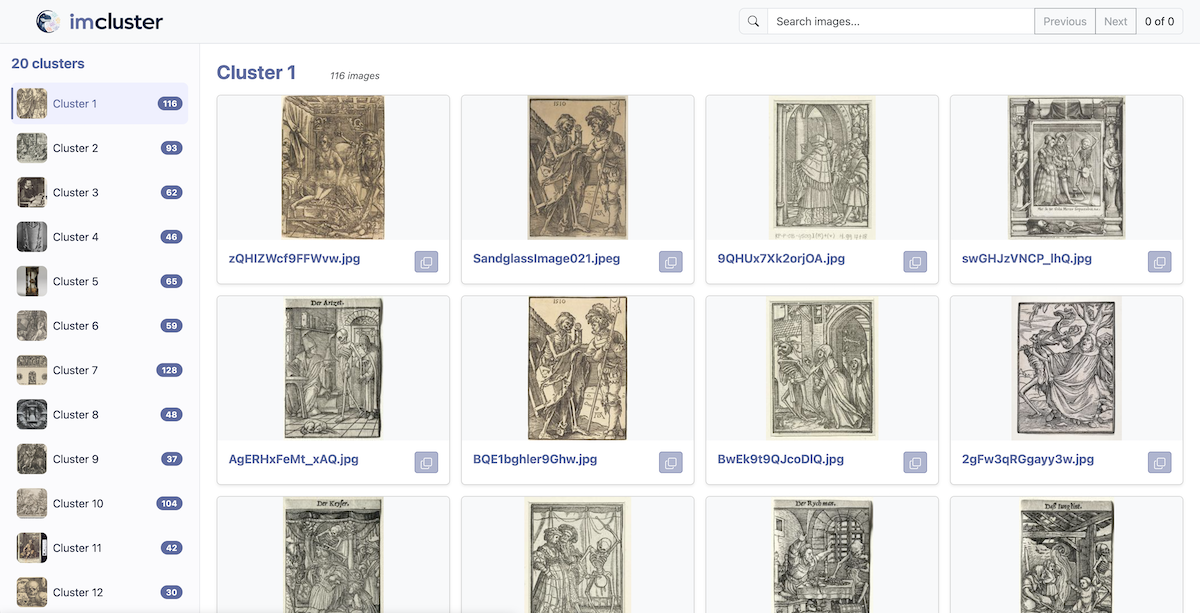
vision models. It produces a reusable cache and a self-contained HTML
gallery organized by cluster.
By default, imcluster uses DINOv3 when its
weights are cached or accessible and otherwise falls back to DINOv2. UMAP and
K-means are the default reduction and clustering methods, with density-based
methods available when the number of groups is not known.
Installation
imcluster requires Python 3.10–3.13:
pip install imcluster
DINOv2 presets are public and require no authentication. DINOv3 model
repositories are gated. Before using --dino-version 3:
Sign in to Hugging Face and open the DINOv3 ViT-B/16 model page.
Review and accept Meta’s DINOv3 license and agree to share the requested contact information. Approval is usually automatic, but access can take several minutes (often 5–15 minutes) to propagate.
Authenticate the machine that will run
imcluster:hf auth login
This opens Hugging Face’s browser login flow and stores the resulting token locally. Confirm the active account with:
hf auth whoami
For a server or non-interactive environment, create a read token in Hugging Face token settings and expose it to the process instead:
export HF_TOKEN=hf_your_token_here
Never commit a Hugging Face token to the repository or place it directly in a script. Accepting access on the website and authenticating locally are both required; a valid token from an account without model access cannot download the weights.
DINOv2 weights use the Apache License 2.0. DINOv3 weights use the DINOv3
license; the imcluster source code uses the Apache License 2.0.
Quick start
Cluster the images directly inside a directory and open the gallery:
imcluster photos/
Include nested directories, request 12 groups, and preserve the outputs:
imcluster photos/ --recursive --n-clusters 12 \
    --cache results.parquet --gallery clusters.html
Inputs may be individual image files, directories, or UTF-8 text manifests with one image path per line. Relative manifest entries are resolved from the manifest’s directory. Supported formats are PNG, JPEG, TIFF, BMP, and GIF.
Outputs
Without output options, imcluster writes temporary processing data and a
temporary HTML gallery, then opens the gallery in the default browser. Pass
--no-open to suppress browser launching.
--cache PATH preserves the Parquet cache, which contains resolved paths,
filenames, feature vectors, cluster labels, thumbnails, and run metadata.
--gallery PATH preserves the standalone HTML gallery. It embeds its styles
and JPEG thumbnails and does not require an internet connection.
If the input list no longer matches an existing cache, imcluster stops with
a clear error. Pass --force to intentionally replace the cache. More
targeted controls are available as --force-features, --force-cluster,
and --force-thumbnails.
After creating a cache, rerun it without repeating the image inputs:
imcluster --cache results.parquet
Models
The default selection is --dino-version auto --size base. Automatic mode
uses DINOv3 when the selected model is cached or accessible with the active
Hugging Face account. Otherwise it reports the fallback and uses DINOv2.
Explicit DINOv2 selection uses --dino-version 2. Its presets are small,
base, large, and max; max selects DINOv2 Giant. For DINOv2,
--arch is ignored. In automatic mode, tiny falls back to DINOv2 Small
and huge falls back to DINOv2 Giant.
Size |
Hugging Face model |
|---|---|
small |
|
base |
|
large |
|
max |
|
DINOv3 is selected with --dino-version 3. Its available presets are:
Architecture |
Size |
Hugging Face model |
|---|---|---|
|
tiny |
|
|
small |
|
|
base |
|
|
large |
|
|
huge |
|
|
max |
|
|
tiny |
|
|
small |
|
|
base |
|
|
large |
|
An arbitrary compatible Hugging Face model overrides the preset:
imcluster photos/ --model organization/model-id
Inference
--device auto selects CUDA, then Apple MPS, then CPU. A device can be
selected explicitly with --device cpu|cuda|mps. --batch-size defaults
to 8; reduce it if inference runs out of memory.
ViT-B is suitable for a quality-oriented default but can be slow on CPU.
--dino-version 2 --size small or --dino-version 3 --size tiny provides
a lighter run. The largest variants require substantial accelerator memory.
Clustering
The available methods use scikit-learn’s clustering algorithms.
By default, UMAP reduces the DINO vectors and K-means clusters the result. Use
--reduce tsne or --reduce pca to select another reduction method, or
--reduce none to cluster the original vectors. --reduction-dims sets
the PCA or UMAP target and defaults to 50. Reduced vectors are cached.
Spectral, K-means, agglomerative, and hierarchical clustering use a cluster count:
imcluster photos/ --clustering spectral --n-clusters 10
DBSCAN discovers groups and marks outliers as the noise cluster:
imcluster photos/ --clustering dbscan \
    --dbscan-eps 0.35 --min-samples 3
HDBSCAN also discovers groups and noise while adapting to varying densities:
imcluster photos/ --clustering hdbscan --min-samples 5
Name clusters with a multimodal language model:
export OPENAI_API_KEY=your-api-key
imcluster photos/ --name --llm gpt-5.6-luna
Cluster naming sends representative cached thumbnails—not the source image
files—to the configured model. It does not send out-of-cluster examples by
default. --in-group-size controls the in-cluster examples and defaults to
10; --out-group-size controls contrasting examples and defaults to 0. The
generated names are stored in the cache and displayed in the gallery while the
underlying numeric cluster IDs remain available for evaluation and reuse.
--llm-temperature controls sampling;
--llm-api-key can pass a key directly, although a provider environment
variable is safer than exposing a secret in shell history.
To evaluate clusters against known classes, provide a CSV with filename and
class columns:
imcluster photos/ --evaluate expected_classes.csv
The class names only need to be consistent. The CLI reports Normalized Mutual Information (NMI), Adjusted Rand Index (ARI), and clustering accuracy (ACC) using an optimal mapping between cluster IDs and expected classes.
Add --metric metrics.csv to save the three scores as a CSV file.
Run imcluster --help for the complete command-line reference.