Usage
Basic run
imcluster photos/
Pass --recursive to search nested directories. Inputs may also be image
paths or text manifests containing one image path per line.
The gallery opens in the default browser. Use --no-open to suppress this,
--gallery PATH to preserve the HTML report, and --cache PATH to retain
the processing cache. Without those paths, temporary outputs are used.
Explore similar images
Click any image card in the gallery to open a comparison modal. The selected image remains on the left, while the right side shows one of its 30 nearest visual neighbours. These neighbours are ranked by cosine similarity between the original model feature vectors. The thumbnail strip and previous/next buttons move through the ranked matches.
Click the similar image on the right to make it the new selected image. The modal rebuilds the comparison using that image’s own nearest neighbours, so you can continue exploring without closing it.
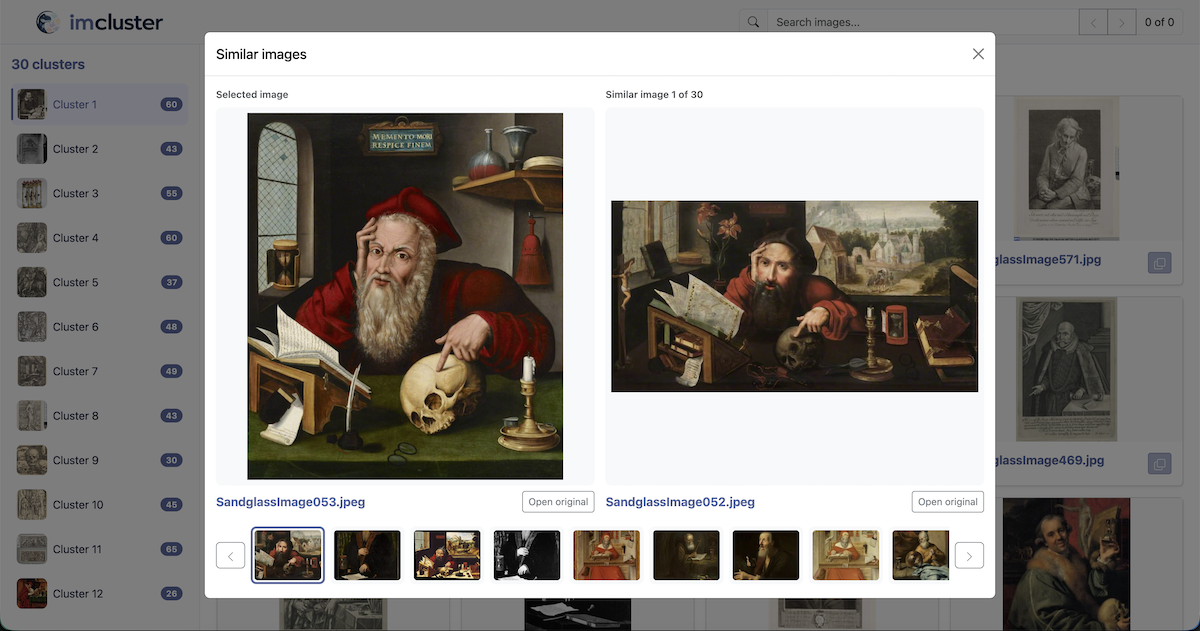
Full-resolution images are loaded from their original file paths. If a source file is unavailable, the modal uses its embedded thumbnail instead. Thumbnail data is embedded only once in the standalone HTML and reused with JavaScript.
Caching
The Parquet file selected by --cache caches expensive stages. It can be
reused only with the same ordered set of resolved image paths. Use --force
to replace it, or a stage-specific force option to recompute part of the
pipeline.
Once a cache exists, its stored image paths can be used without repeating the original inputs:
imcluster --cache results.parquet
Clustering
K-means is the default clustering method. Spectral, K-means, agglomerative,
and hierarchical clustering use --n-clusters. DBSCAN uses
--dbscan-eps; DBSCAN and HDBSCAN share --min-samples and report
outliers as noise.
Dimensionality reduction
By default, UMAP reduces the DINO feature vectors before clustering. PCA and t-SNE can be selected instead, or reduction can be disabled:
imcluster photos/ --reduce umap
imcluster photos/ --reduce tsne
imcluster photos/ --reduce pca
imcluster photos/ --reduce none
Use --reduction-dims to change the default target of 50 dimensions:
imcluster photos/ --reduce umap --reduction-dims 25
PCA and t-SNE use scikit-learn. UMAP uses umap-learn. The reduced vectors are cached, and changing the reduction method or requested dimensions recomputes cluster assignments. UMAP requires at least three images. t-SNE is capped at three output dimensions.
Cluster names
Add --name to generate concise descriptive names with a multimodal LLM:
export OPENAI_API_KEY=your-api-key
imcluster photos/ --name --llm gpt-5.6-luna
For each cluster, imcluster chooses a cosine medoid and then diverse examples
using farthest-first traversal. --in-group-size controls the maximum number
of these examples and defaults to 10. By default, no images from outside
the cluster are sent and the prompt only describes the in-cluster examples.
Set --out-group-size above zero to include nearby outside images as
contrasting examples. Only JPEG thumbnails already stored in the cache are
sent to the LLM; source image files are not included in the prompt.
Names are stored in an algorithm-specific cache column and appear in the
gallery sidebar and headings. Numeric cluster assignments remain unchanged,
so naming does not affect evaluation. Cached names are reused unless the
clusters are recomputed or --force is supplied. Noise produced by DBSCAN or
HDBSCAN retains the name Noise without making an LLM request.
The default naming model is gpt-5.6-luna with temperature 0.2. Select a
different llmloader-compatible multimodal model with --llm and adjust
sampling with --llm-temperature. --llm-api-key is available, but the
provider’s environment variable is preferable because command-line secrets can
be retained in shell history and process listings.
Evaluation
Evaluate cluster assignments against expected classes with a CSV containing
filename and class columns:
filename,class
airplane-01.jpg,airplane
airplane-02.jpg,airplane
forest-01.jpg,forest
Then pass it to the CLI:
imcluster photos/ --evaluate expected_classes.csv
The class values may be any consistent names. imcluster reports Normalized Mutual Information (NMI), Adjusted Rand Index (ARI), and clustering accuracy (ACC). ACC optimally matches numeric cluster IDs to expected classes, so the specific cluster numbers do not affect the score.
Save the scores as a one-row CSV with NMI, ARI, and ACC columns:
imcluster photos/ --evaluate expected_classes.csv --metric metrics.csv